

Lists
A list is a fixed group you manage. Use lists for contacts from a signup source, plan, event, or manual import. To create a list:- Go to Audience in the left sidebar
- Click Lists
- Click Create List
- Name the list and add contacts
Segments
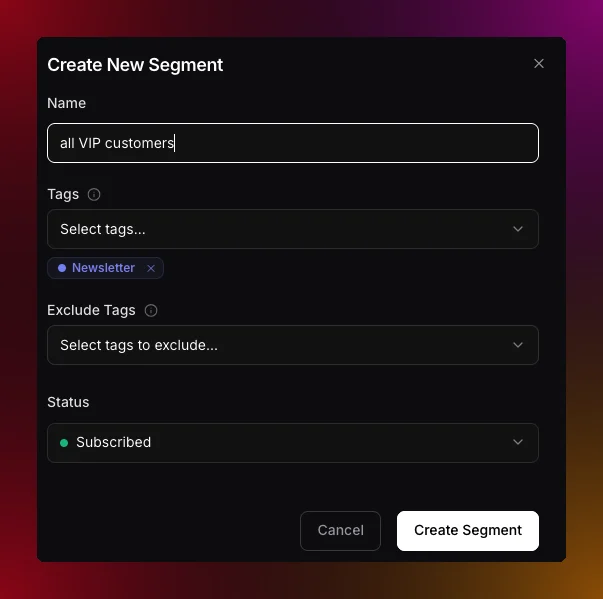
A segment is a smart group that updates automatically based on rules you set. Instead of manually tagging people, you define a filter and Migma keeps the segment up to date as contacts change. For example: everyone who signed up in the last 30 days, or everyone in your VIP list who has not opened an email in 60 days. To create a segment:- Go to Audience in the left sidebar
- Click the Segments tab
- Hit Create Segment
- Give it a name
- Set your filters or leave it open to include everyone
- Click Create Segment
Describe a segment in plain words
You do not have to build filters by hand. The search box at the top of the Create Segment dialog also drafts segments from plain language. Type what you want and Migma turns it into filters, shows the matching contact count, and leaves the draft for you to review before you save. It understands the same things you can build manually:- By attribute — “pro plan contacts in France”, “everyone whose language is Spanish”
- By engagement — “opened in the last thirty days”, “subscribed but never clicked”
- By example — “contacts like alex@acme.com” or “subscribers similar to my best customer”
- By value group — “investors” when their emails end in “.vc”, “everyone on a gmail address”
filters object directly, described in the filter types below.
Segment filter types
A segment can combine any of these filters. They behave the same whether you build the segment in the dashboard or through the API, where they live on the segment’sfilters object.
Stack as many filters as you need. A contact has to satisfy all of them to land in the segment, so each filter you add narrows the group.
Lists vs segments
Not sure which one to use? Here is a simple way to think about it.
In practice, most teams use both. Lists are fixed groups. Segments update as contact data and engagement change.
What do you want to do next?
Add contacts
Add contacts one by one or import a CSV list.
Send a campaign
Use lists and segments to send to the right people.
Preference center
Let contacts choose what they hear from you.
Track results
See how your campaigns perform after sending.