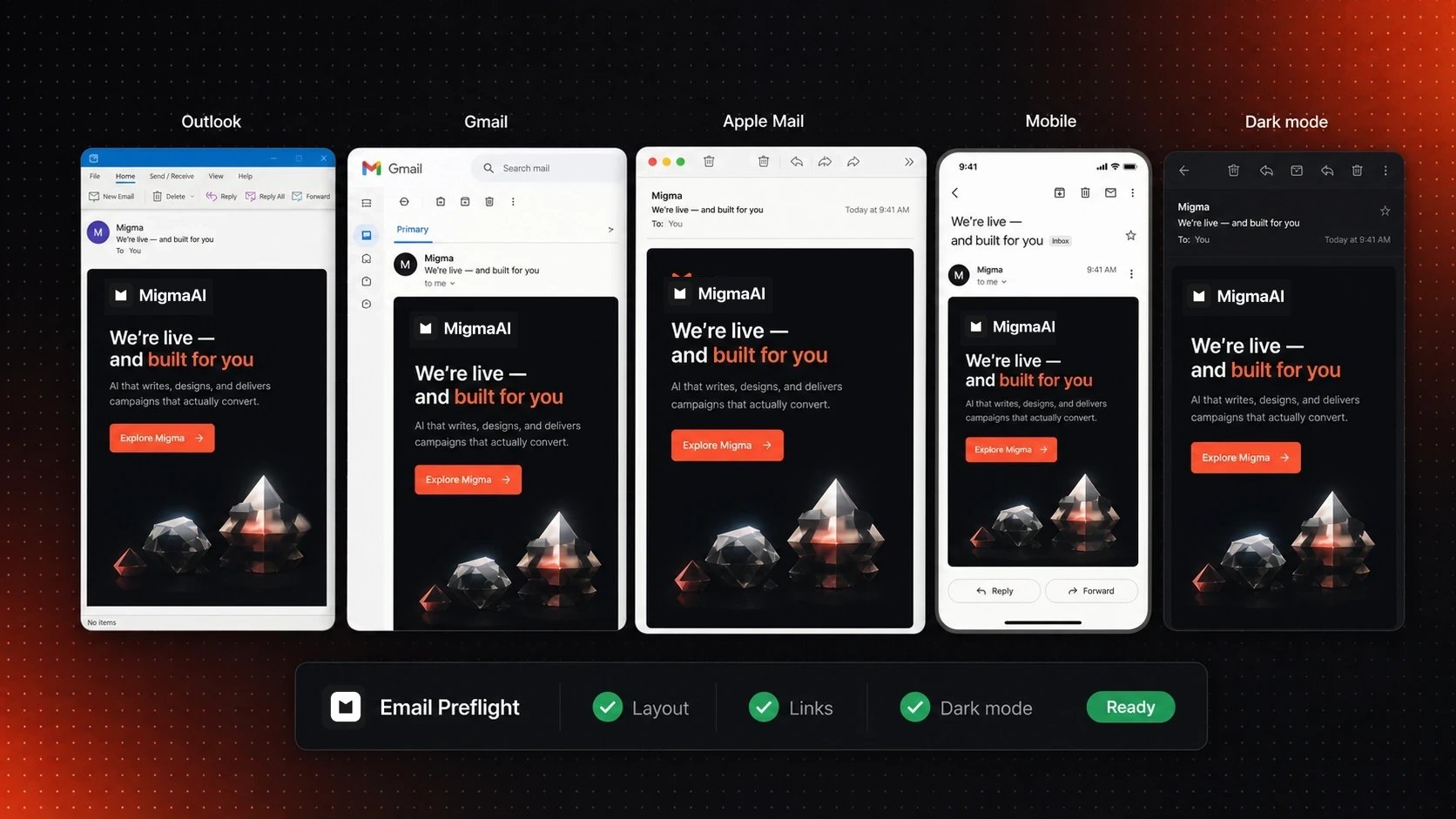
Overview
Send with 100% confidence. Migma’s Email Preflight previews your emails on 30+ real devices and email clients, with automated checks for links, grammar, brand voice, and compatibility.30+ Real Devices
See exactly how emails render on actual devices
Automated Checks
Links, grammar, brand voice, spam score
Fix Before Sending
Catch issues before they reach inboxes
What makes this different: ChatGPT and other tools can’t show you how emails actually render. Migma uses real devices and inboxes to give you pixel-perfect previews.
What Gets Tested
Device & Client Rendering
Desktop Email Clients:Gmail (Chrome, Firefox, Safari)
Outlook 2021/2019/2016 (Windows)
Outlook for Mac
Apple Mail (macOS)
Yahoo Mail
AOL Mail
Gmail App (iOS & Android)
Apple Mail (iPhone, iPad)
Outlook Mobile (iOS & Android)
Yahoo Mobile
Samsung Email
Gmail Web
Outlook.com
Yahoo Web
ProtonMail
All clients with dark mode support
Automated Quality Checks
Link Validation
Link Validation
Tests all links for:
- Broken links (404 errors)
- HTTPS vs HTTP
- Redirects and chains
- Unsubscribe link presence
- Link anchor text
- Malformed URLs
Grammar & Spelling
Grammar & Spelling
Checks for:
- Spelling errors
- Grammar mistakes
- Punctuation issues
- Capitalization consistency
- Typos in subject line
Brand Voice Consistency
Analyzes:
- Tone matching your brand
- Terminology consistency
- Writing style alignment
- Professional vs casual appropriateness
- On-brand messaging
Spam Score
Spam Score
Evaluates:
- Spam trigger words
- Image-to-text ratio
- Link density
- ALL CAPS usage
- Excessive punctuation!!!
Accessibility
Accessibility
Checks:
- Alt text on all images
- Color contrast ratios (WCAG AA)
- Semantic HTML structure
- Screen reader compatibility
- Heading hierarchy
Mobile Responsiveness
Validates:
- Touch target sizes (44px minimum)
- Text readability on small screens
- Layout reflow
- Image scaling
- CTA button accessibility
How to Run Preflight
1
Open Email in Editor
Navigate to any email conversation or draft
2
Click Preflight Button
Look for ”📋 Preflight” button in toolbar
3
Select Devices
Quick Options:
- All devices (comprehensive)
- Mobile only (faster)
- Desktop only
- Custom selection
4
Run Tests
Click “Run Preflight” - takes 30-60 seconds
5
Review Results
See screenshots from all devices plus automated check results
6
Fix Issues
Address any flagged problems
7
Re-test
Run preflight again to confirm fixes
Reading Preflight Results
Device Screenshots
What you see:- Grid View
- Detail View
- Side-by-Side
Thumbnail grid of all devices side-by-sidePerfect for:
- Quick visual scan
- Spotting layout issues
- Comparing across clients
Check Results Dashboard
Color-coded results:🟢 Passed
All checks passed - ready to send
🟡 Warnings
Minor issues - review recommended
🔴 Failed
Critical issues - fix before sending
Common Issues & Fixes
🔴 Dark Mode Text Unreadable
Problem: White text on white background in dark modeFix:Or tell Migma: “Fix dark mode text visibility”
🔴 Broken Links
🔴 Broken Links
Problem: Links return 404 or errorsFix:
- Review broken link list
- Update URLs in email
- Re-run preflight to verify
⚠️ High Spam Score
⚠️ High Spam Score
Problem: Spam score above 5/10Common causes:
- Too many exclamation marks!!!!
- ALL CAPS WORDS
- Spam trigger words (FREE, URGENT, WINNER)
- Too many links
- No unsubscribe link
- Remove excessive punctuation
- Use sentence case
- Reduce link density
- Add unsubscribe link
⚠️ Missing Alt Text
⚠️ Missing Alt Text
Problem: Images without alt textFix:
- Click each image
- Add descriptive alt text
- Benefits: accessibility + shows if images blocked
🔴 Layout Breaks on Outlook
Problem: Email looks broken in Outlook 2016/2019Cause: Outlook uses Word rendering engine (limited CSS)Fix:
- Use table-based layouts
- Avoid flexbox/grid
- Use inline styles
- Tell Migma: “Make compatible with Outlook”
⚠️ Mobile Text Too Small
Problem: Text under 14px on mobileFix:
- Increase font sizes for mobile
- Use media queries
- Or: “Increase mobile text sizes”
Preflight Best Practices
Essential Testing Guidelines
Always preflight before important campaigns
Test on key devices your audience uses (check analytics)
Fix red flags immediately - they impact deliverability
Address warnings for better user experience
Re-test after fixes to confirm issues resolved
Save successful emails as templates
Dark Mode Optimization (Critical for Deliverability)
Why Dark Mode Testing Matters:- Over 60% of users now prefer dark mode
- Email clients automatically transform emails in dark mode—often breaking layouts
- Proper dark mode implementation signals quality to email providers
- Deliverability Impact: Our studies show dark mode-optimized emails achieve better inbox placement
- ✅ Always test dark mode on Gmail, Outlook, and Apple Mail
- ✅ Check text contrast - ensure readability in both light and dark modes
- ✅ Verify brand colors don’t wash out or become invisible
- ✅ Test images and logos - some need dark mode variants
- ✅ Review CTAs - buttons must be visible and clickable in dark mode
HTML Quality = Better Deliverability
Case Study Finding: High-quality HTML emails significantly outperform plain-text emails for inbox placement, contrary to popular belief.
- Plain-text mass emails are spam filter red flags (low effort = suspicious)
- Minimal engagement signals (no time tracking, no click behavior)
- Associated with low-quality cold outreach and spam
- Result: Higher spam folder placement rates
- Professional, well-structured HTML signals legitimate business communication
- Better engagement metrics (time spent, clicks) send positive signals to providers
- Clean code and email best practices trigger quality indicators
- Result: Consistently higher inbox placement rates
- Clean HTML structure (no spam-triggering patterns)
- Proper email standards compliance
- Professional design signals
- Engagement-friendly layout
- All factors that improve deliverability
Advanced Features
Scheduled Preflight
Auto-run preflight before scheduled sends:- Schedule email send
- Enable “Preflight before send”
- If tests fail, send is paused
- Fix issues and reschedule
Preflight Reports
Download comprehensive report:- All device screenshots (PDF)
- Check results summary
- Issue recommendations
- Historical comparison
Custom Device Sets
Save device configurations: Example sets:- “My Audience” - based on your analytics
- “Enterprise” - Outlook-heavy
- “Consumer” - Gmail + Apple Mail
- “Mobile-First” - Mobile devices only
Migma vs ChatGPT
| Feature | Migma Email Preflight | ChatGPT |
|---|---|---|
| Actual Device Testing | ✅ 30+ real devices | ❌ No preview |
| Dark Mode Preview | ✅ Yes | ❌ No |
| Link Validation | ✅ Automated | ❌ Manual |
| Spam Score Check | ✅ Built-in | ❌ No |
| Grammar Check | ✅ Automated | ⚠️ Via prompt |
| Outlook Compatibility | ✅ Real Outlook tests | ❌ Can’t verify |
| Mobile Rendering | ✅ Actual devices | ❌ No preview |
Pricing & Limits
- Free Plan
- Basic Plan
- 5 preflight tests/month
- 10 devices
- Basic checks only
Next Steps
Visual Editor
Edit emails visually before testing
Export Options
Export your tested emails
Send Emails
Send your preflight-approved emails
Templates
Use pre-tested templates