

Pricing Plans
Migma has two subscription plans — Premium and Business. Both include a 7-day free trial when you first subscribe (see below).Premium
**950/year
- Personal workspace
- 100 AI emails per day
- 200,000 emails/month sending
- AI image & GIF generation
- Export to Mailchimp & more
- Figma design import
- Compatibility testing
Business
**2,748/year
- Team workspace
- 2 editor seats included
- Real-time collaboration
- Unlimited AI emails
- 3M emails/month sending
- Unlimited AI images & GIFs
- Best AI models
- Unlimited brand kits
- Priority support
Need SSO, custom sending limits, or compliance packages? Contact us about Enterprise.
Global Deliverability (add-on). See your email from the mailbox side: cross-provider campaign analytics, pre-send inbox placement testing, and domain and IP blocklist reputation monitoring. Available on any paid plan. Explore Global Deliverability or contact us to add it.
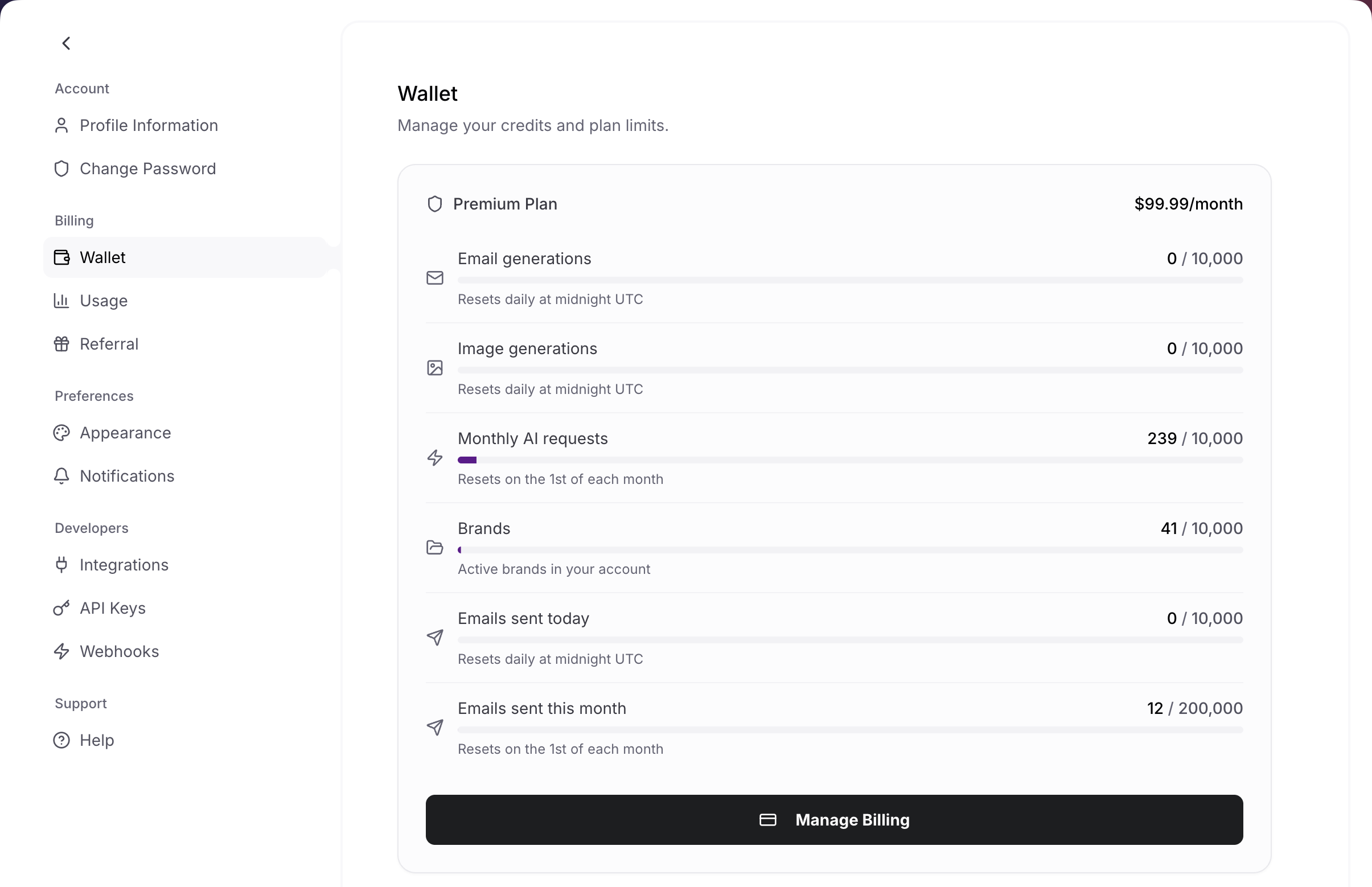
Track usage, rates, and account activity from the settings page
Workspaces, seats, and real-time
Billing follows the active workspace. Your personal workspace uses your own plan. A team workspace uses the owner’s plan, seats, and sending quota.Workspaces
Switch between personal and team workspaces. Owners pay for the workspace plan, sending quota, and seats.
Seats
Business includes 2 editor seats. Commenters and viewers are free. Extra editor seats can be added as the team grows.
Real-time
Presence, cursors, canvas sync, and generation awareness turn on automatically when teammates open the same brand.
Joining a paid team workspace does not require a paid personal plan. If the workspace owner gives you a seat, you get Business editor access in that workspace.
Free Trial
Every new user gets a 7-day free trial on their selected paid plan. Here’s how it works:1
Sign up and choose a plan
Create your account at migma.ai and select Premium or Business.
2
$0 due today
You won’t be charged anything when you start your trial. Your payment method is saved for after the trial period.
3
Full access for 7 days
Enjoy all the features of your selected plan during the trial — no restrictions.
4
Billing starts automatically
After 7 days, your subscription begins and you’ll be charged the plan price. You’ll receive a reminder email before your trial ends.
Why was I charged immediately?
If you were charged right away instead of receiving a free trial, it’s likely because:- You had a previous account — If you signed up before (even months ago) and used a trial, the system recognizes your account and skips the trial period.
- Previous subscription history — If you’ve had a paid subscription in the past, the trial won’t apply again.
Managing Your Subscription
View your current plan
1
Open Settings
Click your profile icon in the top-right corner and select Settings.
2
Go to Billing
Navigate to the Billing section to see your current plan, usage, and next billing date.
Upgrade or downgrade
Upgrading your plan
Upgrading your plan
Upgrades take effect immediately. You’ll be charged a prorated amount for the remainder of your current billing period.
- Go to Settings → Billing
- Click Manage billing
- Select your new plan
- Confirm the change
Downgrading your plan
Downgrading your plan
Downgrades are scheduled for the end of your current billing period. You’ll keep access to your current plan’s features until then.
- Go to Settings → Billing
- Click Manage billing
- Select the lower plan
- Confirm the change
Switching between monthly and annual
Switching between monthly and annual
Save money by switching to annual billing:
- Premium: $950/year (save ~21% vs. monthly)
- Business: $2,748/year (save ~23% vs. monthly)
Canceling Your Subscription
You can cancel your subscription at any time. Here’s what to expect:1
Go to Billing settings
Navigate to Settings → Billing in your Migma dashboard.
2
Click Cancel subscription
Select the cancel option. You’ll be asked to confirm.
3
Keep access until period ends
Your subscription remains active until the end of your current billing period. You won’t be charged again.
4
Subscription ends
After your billing period ends, your paid subscription ends. You can resubscribe anytime from Settings → Billing.
Changed your mind? You can reactivate your subscription at any time before your billing period ends by clicking Reactivate subscription in your billing settings. No need to re-enter payment details.
Canceling during your free trial
If you cancel during your 7-day trial:- You won’t be charged at all
- You’ll keep access until the trial period ends
- Your paid subscription will not continue after the trial unless you subscribe
Refunds
If you were charged unexpectedly or aren’t satisfied with the service, contact our support team:Email support
In-app chat
Click the chat icon in the bottom-right corner of your dashboard
Payment & Security
What payment methods are accepted?
What payment methods are accepted?
Migma accepts all major credit and debit cards:
- Visa
- Mastercard
- American Express
- Discover
How do I update my payment method?
How do I update my payment method?
- Go to Settings → Billing
- Click Manage billing
- Update your payment method in the Stripe portal
Where can I find my invoices?
Where can I find my invoices?
All invoices and payment history are available in the Stripe billing portal:
- Go to Settings → Billing
- Click Manage billing
- View your invoice history and download receipts
Is my payment information secure?
Is my payment information secure?
Yes. Migma uses Stripe for payment processing, which is PCI DSS Level 1 certified — the highest level of security certification in the payments industry. Your card details are encrypted and never touch our servers.
Common Billing Questions
I was charged but expected a free trial — what happened?
I was charged but expected a free trial — what happened?
The free trial is available once per account. If you previously created an account with the same email address and used a trial (even if it was months ago), you won’t receive another trial. This is the most common reason for an unexpected charge.What to do: Contact our support team at support@migma.ai. We can review your account and offer a refund if appropriate.
When will I be charged after my trial?
When will I be charged after my trial?
Your first charge occurs automatically 7 days after you started your trial. You’ll receive an email reminder before the trial ends so you can cancel if needed.
What happens if my payment fails?
What happens if my payment fails?
If a payment fails, Stripe will retry the charge a few times. You’ll receive email notifications about the failed payment. If the payment continues to fail, your subscription will be canceled.Update your payment method in Settings → Billing → Manage billing to avoid interruptions.
Can I pause my subscription instead of canceling?
Can I pause my subscription instead of canceling?
Currently, Migma doesn’t offer a pause option. You can cancel your subscription and resubscribe later when you’re ready. Your account data is retained for 90 days after cancellation.
Do I lose my data if I cancel?
Do I lose my data if I cancel?
No — your data is retained for 90 days after cancellation. During this time, you can resubscribe and pick up where you left off. After 90 days, data may be permanently deleted.
Next Steps
Create your first email
Start generating emails in under 5 minutes
Import your brand
Set up your brand identity for on-brand emails
Contact support
Get help with any billing questions