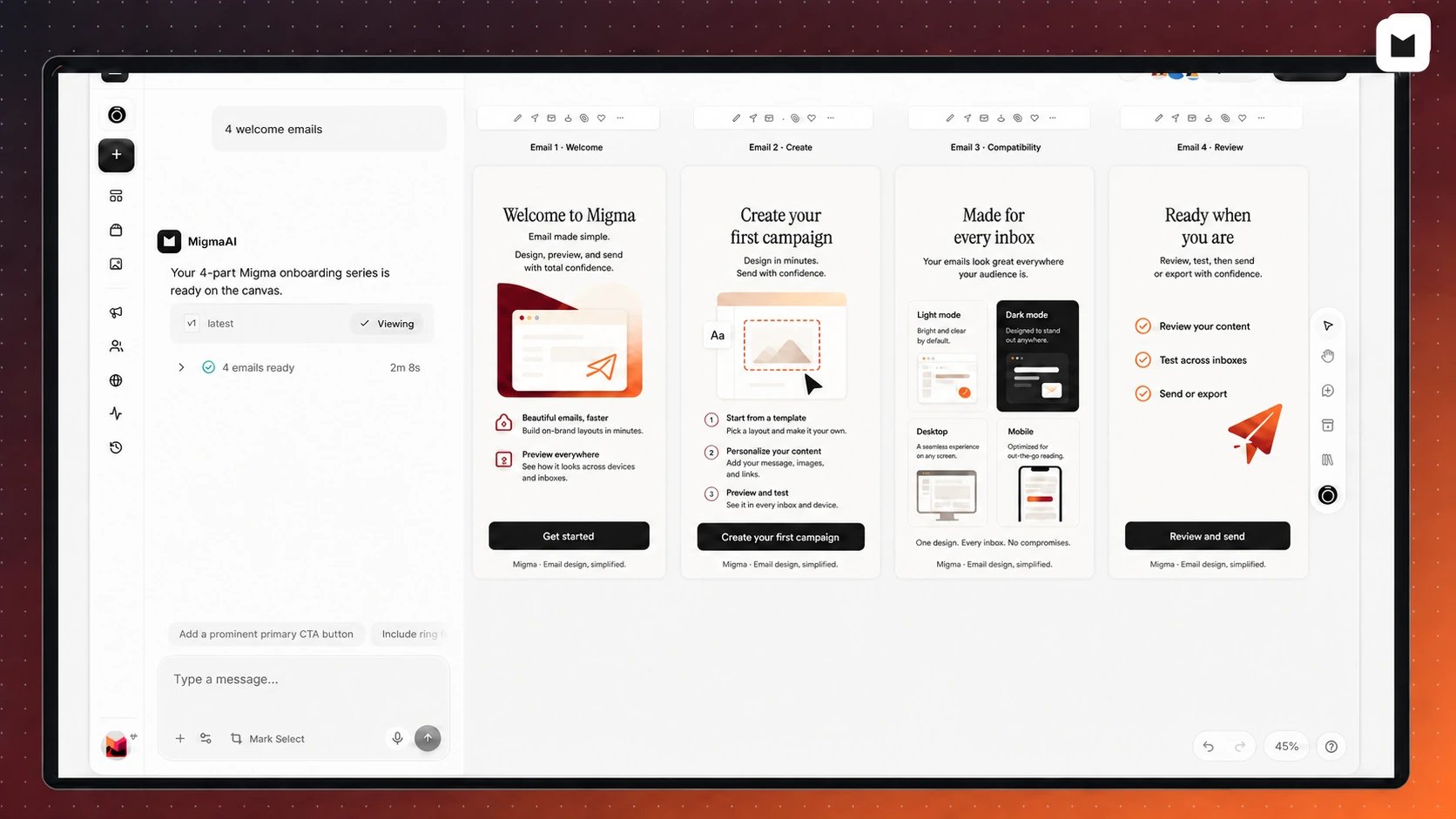
Migma: Complete Email Platform

The first all-in-one AI email platform. Think of Migma as “Lovable for Email” - an AI-native conversational platform that handles everything from creation to delivery. No other platform can do what Migma does:
  • Generate emails in 30 seconds from natural conversation
  • Preview on 30+ real devices before sending
  • Select products directly from Shopify
  • Pull live data from 26+ tools via MCP
  • Send directly as a full ESP
  • Export to any format (HTML, React Email, MJML)
✨ Latest Updates (Nov 2025):
  • Migma is now conversational - chat about your business, generate content, ask questions in natural language
  • Generate social media posts and on-brand images for Instagram, LinkedIn, Facebook
  • Image → Email improved - higher fidelity extraction, smarter layouting, better CTA mapping
  • Figma → Email improved - cleaner HTML/React output, better component detection
  • Remix emails improved - faster variants, better brand consistency
  • MCP server access for tool integrations and automation

What Makes Migma Different

Email Preflight on Real Devices

Preview on 30+ actual devices with automated link, grammar, and brand checks

On-Brand AI Images

Generate images with your logo, products, and brand colors - no generic stock photos

YouTube → Email

Paste YouTube URL - Migma watches, extracts content, generates email

One-Click Brand Import

Auto-fetch logo, colors, fonts from any website - manage multiple brands

Shopify Integration

Select products directly from your store - live prices and images pulled automatically

Figma → Email

Import Figma designs and export clean HTML/React Email/MJML

Complete Email Workflow in One Platform

Create from Anything:
  • 💬 Conversational AI - chat naturally about your business and needs
  • 🌐 Superpower Context Engine - pull from URLs, web search, screenshots
  • 🛍️ Shopify products - select directly from your store catalog
  • 📺 YouTube videos - paste URL, Migma watches and summarizes
  • 🖼️ Image → Email - upload screenshot, Migma recreates it
  • 🎨 Figma → Email - import designs, export production-ready code
  • 📋 HTML clone - import existing HTML (CMD+Shift+V)
  • 🔌 26+ MCP integrations - Notion, Linear, Stripe, GitHub, and more
Perfect Your Email:
  • 🖼️ Visual editor with drag-and-drop
  • 🤖 On-brand AI image generation - incorporates logo, products, colors
  • 📱 Preflight on 30+ real devices - Gmail, Outlook, Apple Mail, etc.
  • Automated checks - links, grammar, spelling, brand voice
  • 🌍 40+ email client compatibility testing
  • 🔤 Multi-language support - generate emails in any language
  • 🎯 Remix and variants - create A/B tests instantly
Export & Send:
  • 📧 Send directly - Migma is a full ESP (SES, SendGrid, Resend)
  • 👥 Audience management - subscribers, tags, preference center
  • 📤 Export to ESPs - Mailchimp, Klaviyo, HubSpot
  • 💾 Export as code - HTML, React Email, MJML
  • 🔗 API for automation - programmatic access with remix via referenceId
  • 🧠 Migma Memory - learns your brand voice and what converts
Platform Advantages:
  • CDN integration - automatic image optimization and fast delivery
  • 🎨 On-brand preference center - inherits your colors, logo, typography
  • 🔓 No vendor lock-in - export clean code anytime
  • 🆓 Generous free plan with BYO API key option

Detailed Feature Breakdown

1. Email Preflight on Actual Devices

Send with 100% confidence. Preview your emails on 30+ real devices and get automated checks for links, grammar, and brand voice.
Test on actual devices, not simulators:
  • Gmail (Desktop, iOS, Android)
  • Outlook (Windows, Mac, Web)
  • Apple Mail (macOS, iOS)
  • Yahoo Mail
  • Samsung Email
  • 25+ more email clients
See exactly what subscribers see - fonts, images, spacing, CTAs
Before you send, Migma checks:
  • ✅ All links are valid and working
  • ✅ Grammar and spelling errors
  • ✅ Brand voice consistency
  • ✅ Image alt text for accessibility
  • ✅ Mobile responsiveness
  • ✅ Spam trigger words
Catch problems before sending:
  • Images not loading
  • Broken layouts
  • Missing fonts
  • CTA buttons not visible
  • Dark mode issues

Email Preflight Docs

Full documentation

2. On-Brand AI Image Generation

Stop using generic stock photos. Migma generates stunning, on-brand images that incorporate your logo, products, and brand colors. What makes it different:
  • Automatically includes your logo in generated images
  • 🎨 Uses your exact brand colors from brand import
  • 📦 Can incorporate your products from Shopify
  • 🚀 CDN hosted - images optimized and delivered fast
Use cases:
  • Hero images for campaigns
  • Product photography
  • Event graphics
  • Social media visuals
  • Background patterns
Access: Available in Creative Studio (click any image in visual editor) or via prompts when creating emails

AI Image Generation Docs

Learn more about Creative Studio

3. YouTube → Email

Paste any YouTube URL and Migma will:
  • Watch the entire video
  • Extract key content and talking points
  • Generate a ready-to-send email summary or announcement
Perfect for:
  • Turning webinars into email recaps
  • Promoting video content
  • Creating “What We Talked About” emails
  • Newsletter summaries from video podcasts
Example:
Paste: https://youtube.com/watch?v=abc123

Migma generates:
- Email with video thumbnail
- Key points from the video
- Quotes and highlights
- CTA to watch full video

4. One-Click Brand Import

Auto-fetch logo, colors, fonts, images from any website. What Migma extracts:
  • 🎨 Visual Identity: Logos (primary, secondary, favicon), color palette, typography
  • ✍️ Brand Voice: Writing tone, personality, common phrases
  • 📋 Content Structure: Page hierarchy, navigation, key sections
Multi-brand support:
  • Manage multiple brands in one account
  • Switch between brands instantly
  • Perfect for agencies with multiple clients
Time saved: 2-3 hours of manual brand setup → 30 seconds automatic import

Brand Import Docs

Configure your brand

5. Shopify Integration ⭐

Select products directly from your store when creating emails. The killer feature:
  • Browse your Shopify catalog visually
  • Select specific products by name
  • Select entire collections
  • Filter by tags, price range, or best sellers
  • Migma pulls live data: images, prices, descriptions, URLs
Example prompts:
"Create product showcase with my 'Premium Leather Wallet' and 'Canvas Tote'"
"Show all items from my 'Holiday Sale' collection"
"Feature products tagged 'Best Seller' with over 100 sales"
Always up-to-date: Prices and inventory sync automatically - no manual copying!

Shopify Integration Docs

Full Shopify guide

6. Figma → Email

Import designs from Figma and export clean HTML/React Email. How it works:
  1. Design email in Figma (any layout, any complexity)
  2. Connect Figma to Migma
  3. Import design - Migma converts to email-safe HTML
  4. Edit in visual editor if needed
  5. Export as HTML, React Email, or MJML
Benefits:
  • Designers work in Figma (their tool of choice)
  • Developers get clean, production-ready code
  • No vendor lock-in - export anytime
  • Better component detection and font handling (Nov 2025 improvements)

Figma Integration Docs

Import from Figma

7. Conversational AI

Chat naturally with Migma about your business. No more rigid prompts. Just talk:
You: "We're launching a new product next week"
Migma: "Exciting! Tell me about the product."
You: "It's a smartwatch with 2-week battery life"
Migma: "Got it. Who's the target audience?"
You: "Fitness enthusiasts who hate charging devices"
Migma: [Generates launch email highlighting battery life]
Migma understands:
  • Business context and goals
  • Previous conversations and emails
  • Your brand voice and style
  • What works for your audience

8. Superpower Context Engine

Pull live content from anywhere:
  • URLs
  • Screenshots
Paste any URL - Migma fetches content:
  • Blog posts → Newsletter summaries
  • Product pages → Launch emails
  • Landing pages → Promotional emails
  • News articles → Commentary emails

9. Image → Email

Upload any email screenshot and Migma recreates it. Nov 2025 improvements:
  • Higher fidelity extraction
  • Smarter layout detection
  • Better CTA mapping
  • Improved text recognition
Use cases:
  • Clone competitor emails
  • Recreate inspiration
  • Migrate old campaigns
  • Learn from successful designs
Process: Upload image → Migma analyzes → Generates email with YOUR brand → Edit if needed

Image Clone Docs

Clone from images

10. HTML Clone

Import existing HTML emails (CMD+Shift+V). Two modes:
  • Exact Clone: Preserves HTML exactly as-is
  • Inspired Clone: Rebuilds with Migma components, applies your brand
Perfect for:
  • Migrating from another platform
  • Updating old campaigns
  • Learning from successful emails
  • Building on existing templates
Keyboard shortcut: CMD+Shift+V (Mac) or Ctrl+Shift+V (Windows)

11. Visual Editor

Full drag-and-drop editor with WYSIWYG controls. Edit everything visually:
  • Text content and styling
  • Images and backgrounds
  • Buttons and CTAs
  • Sections and layouts
  • Spacing and alignment
  • Mobile responsiveness
Features:
  • Undo/redo
  • Device preview (desktop, tablet, mobile)
  • Component library
  • Custom HTML blocks
  • Template system

Visual Editor Docs

Complete editor guide

12. Email Client Compatibility Testing

Rendering checks across 40+ email clients. Tested automatically:
  • Gmail (Web, iOS, Android, IMAP)
  • Outlook (2007-2021, Mac, Web, iOS)
  • Apple Mail (macOS, iOS, iPad)
  • Yahoo Mail (Web, Mobile)
  • AOL Mail
  • Samsung Email
  • Thunderbird
  • Windows Mail
  • And 25+ more
Catch issues before they reach subscribers.

13. Multi-Language Support

Generate emails in any language instantly. How it works:
"Create the same email in Spanish"
"Generate this in French, German, and Italian"
"Translate to Japanese with cultural adaptations"
Migma handles:
  • Translation
  • Cultural nuances
  • Right-to-left languages (Arabic, Hebrew)
  • Character sets and encoding

14. MCP Integrations (26+ Tools)

Pull live data from your favorite tools. Available integrations:
  • E-commerce: Shopify, Klaviyo, Wix, Stripe, Square, PayPal
  • Productivity: Notion, Linear, Atlassian (Jira/Confluence), Todoist
  • Development: GitHub, Sentry, Figma
  • Communication: Slack, Intercom
  • Databases: PostgreSQL, MySQL, Airtable, Neon, Pinecone
  • Creative: Canva, Webflow
  • Data: CoinGecko, DeepWiki, EdgeOne Pages
  • CRM: Salesforce
Example use cases:
  • Create newsletter from Notion content calendar
  • Generate sprint update from Linear issues
  • Send product launch with Shopify inventory
  • Create bug fix email from GitHub releases

MCP Integrations Docs

Browse all 26 integrations

15. Direct Sending (Full ESP)

Migma is not just a design tool - it’s a complete ESP. Connect and send via:
  • Amazon SES - $0.10 per 1,000 emails
  • SendGrid - Advanced analytics and tracking
  • Resend - Modern API, React Email support
Audience management:
  • Subscribers with tags
  • Segmentation
  • On-brand preference center
  • Unsubscribe handling
  • CSV bulk import
Sending features:
  • Send to entire audience or segments
  • Batch processing
  • Progress tracking
  • Send logs and analytics

Sending Docs

Learn about sending

16. Export Options

No vendor lock-in. Export to any format. Export formats:
  • HTML - Universal, works anywhere
  • React Email - TypeScript components
  • MJML - Responsive email framework
Export destinations:
  • Mailchimp (campaigns or templates)
  • Klaviyo (flows and campaigns)
  • HubSpot (templates)
  • Any ESP via HTML
API access:
  • Programmatic email generation
  • Remix via referenceId
  • Bulk operations
  • Workflow automation

Export Options Docs

All export formats

17. Remix and Variants

Create A/B test variants instantly. Nov 2025 improvements:
  • Faster variant generation
  • Better brand consistency
  • Smarter constraint handling
How it works:
  1. Create original email
  2. Click “Remix”
  3. Specify changes: “Make CTA more urgent” or “Use different hero image”
  4. Migma generates variant maintaining structure
Use cases:
  • A/B test subject lines
  • Test different CTAs
  • Seasonal variations
  • Audience-specific versions

Remix Docs

Learn about remixing

18. Migma Memory

Learns your brand voice and what converts. Knowledge base:
  • Add your previous emails
  • Migma learns your style
  • Future emails match patterns
  • Click “Add to Knowledge Base” for good emails
The more you use Migma, the better it gets at:
  • Writing in your voice
  • Using your terminology
  • Matching your layouts
  • Understanding what works for your audience

19. Templates and Inspiration

Build using ReallyGoodEmails-inspired templates. Template library includes:
  • Newsletters
  • Product launches
  • Promotional emails
  • Welcome series
  • Event invitations
  • Transactional emails
Drag-and-drop editing: Start with template, customize to your brand

20. API for Automation

Programmatic access to all Migma features. API capabilities:
  • Generate emails from prompts
  • Remix via referenceId
  • Bulk email creation
  • Export to any format
  • Send directly
  • Manage audiences
Integrations:
  • ChatGPT
  • Cursor
  • n8n workflows
  • Custom automation
Example workflow:
// Generate personalized emails at scale
const response = await fetch('https://api.migma.ai/v1/emails/generate', {
  method: 'POST',
  body: JSON.stringify({
    prompt: "Create product launch email",
    remixReferenceId: "template_123",
    variables: { product: "New Widget", price: "$99" }
  })
});

API Documentation

Complete API reference

21. Social Media Post Generation

NEW: Generate social posts from emails or prompts. Supported platforms:
  • Instagram (posts and stories)
  • LinkedIn (posts and articles)
  • Facebook (posts and ads)
Features:
  • On-brand images with logo and colors
  • Platform-optimized copy
  • Hashtag suggestions
  • Multiple variants
Workflow: Create email → Click “Generate Social Posts” → Get Instagram, LinkedIn, Facebook versions

22. Preference Center

On-brand by default. Inherits from brand import:
  • Your colors
  • Your logo
  • Your typography
  • Your style
Features:
  • Custom preference categories
  • Unsubscribe options
  • Frequency preferences
  • Topic selections
No coding required - preference center is automatically branded and hosted

Preference Center Docs

Manage preferences

Migma vs Other Platforms

Migma vs ChatGPT

FeatureMigmaChatGPT
Real device testing✅ 30+ actual devices❌ No device previews
CDN integration✅ Built-in image CDN❌ No CDN pipeline
Visual editor✅ Full WYSIWYG editor❌ Text only
On-brand images✅ With logo & colors❌ No brand pipeline
Preflight checks✅ Links, grammar, compatibility❌ No automated checks
Figma import✅ Export clean code❌ Can’t import Figma
Direct sending✅ Full ESP❌ No sending

Migma vs Traditional Email Builders

FeatureMigmaMailchimp/Klaviyo
AI generation✅ 30 seconds❌ Manual design
Shopify products✅ Select directly❌ Manual copy/paste
Real device testing✅ 30+ devices❌ Simulators only
MCP integrations✅ 26+ tools❌ Limited
Export formats✅ HTML, React, MJML❌ Locked-in

Get Started


Need Help?