> ## Documentation Index
> Fetch the complete documentation index at: https://docs.migma.ai/llms.txt
> Use this file to discover all available pages before exploring further.
# Remix Emails
> Use any email as a starting point for your next campaign.
Found an email you love? Instead of starting from scratch, remix it. Migma takes the layout and structure of any email and rebuilds it with your brand and your content. Same proven design, your voice.
## How it works
1. Find an email you want to remix
2. Click **Remix** on it
3. Write a prompt describing what you want
4. Hit **Enter**
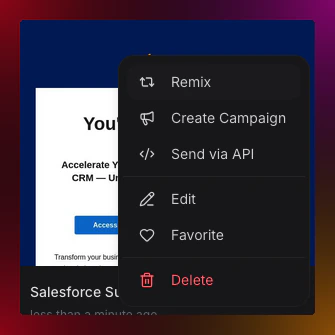 Migma keeps the layout, sections, and visual structure from the original. Everything else, your colors, fonts, logo, and copy, comes from your brand and prompt.
***
## Where to find emails to remix
**Trending** — Browse [migma.ai/trending](https://migma.ai/trending) to see popular public emails. Hover over any card to preview it, filter by type (newsletter, promo, product launch), and hit **Remix** when you find one you like.
**Your emails** — Go to **Templates** and open the **Your Emails** tab. Any email you've previously made can be remixed into something new.
**Competitors** — If you've set up [competitor tracking](/creating-emails/competitor-tracking), their emails show up under the **Competitors** tab in **Templates**.
***
## Good times to use Remix
* You saw an email with a great layout and want something similar for your brand
* You want to reuse a past campaign with updated content
* You want to try a seasonal version of something that already worked
* You want to test two different approaches to the same campaign
***
## What do you want to do next?
Find popular emails to remix from the community.
Collect competitor emails and remix their best designs.
Click into any part of your remixed email to adjust text, images, or colors.
See how your remixed campaign performs after sending.
Migma keeps the layout, sections, and visual structure from the original. Everything else, your colors, fonts, logo, and copy, comes from your brand and prompt.
***
## Where to find emails to remix
**Trending** — Browse [migma.ai/trending](https://migma.ai/trending) to see popular public emails. Hover over any card to preview it, filter by type (newsletter, promo, product launch), and hit **Remix** when you find one you like.
**Your emails** — Go to **Templates** and open the **Your Emails** tab. Any email you've previously made can be remixed into something new.
**Competitors** — If you've set up [competitor tracking](/creating-emails/competitor-tracking), their emails show up under the **Competitors** tab in **Templates**.
***
## Good times to use Remix
* You saw an email with a great layout and want something similar for your brand
* You want to reuse a past campaign with updated content
* You want to try a seasonal version of something that already worked
* You want to test two different approaches to the same campaign
***
## What do you want to do next?
Find popular emails to remix from the community.
Collect competitor emails and remix their best designs.
Click into any part of your remixed email to adjust text, images, or colors.
See how your remixed campaign performs after sending.