> ## Documentation Index
> Fetch the complete documentation index at: https://docs.migma.ai/llms.txt
> Use this file to discover all available pages before exploring further.
# Seats & Team Billing
> Business plan seats: who needs one, how to add seats, and how they relate to workspaces.
On the **Business** plan, a **seat** is a paid slot for someone who **edits**: generate emails, change designs, send campaigns. **Commenters** and **viewers** do not use seats. You pay per editor, not per brand.
You can also invite an editor as a **free collaborator**: they edit and collaborate without using a seat, and their AI generation runs on their own plan's credits instead of Premium-level limits. See [Free collaborators](#free-collaborators).
Seats apply to the **Business** plan. Roles are in [Team access](/collaboration/team-access). Workspaces and shared credits are in [Workspaces](/collaboration/workspaces).
***
## Who uses a seat
| Role | Uses a seat? |
| ---------------------------------------------- | :----------: |
| Owner / Admin / Manager | Yes |
| Editor | Yes |
| Editor or Manager invited as free collaborator | No |
| Commenter | No |
| Viewer | No |
One person uses **one seat** across every brand they can edit in that workspace.
Invite stakeholders as **Commenter** or **Viewer** when they only review.
***
## Free collaborators
A **free collaborator** is an editor or manager who holds no seat. They get the full collaboration experience: live editing, canvas sync, sending from the brand. The difference is AI generation, which runs on **their own plan's credits**. A seat is what grants a collaborator Premium-level generation.
* Workspace **owners and admins** choose this at invite time: check **Free collaborator** when inviting an editor or manager, from a brand's Share panel or from **Settings → People & Access**.
* A free collaborator who is a **manager** can invite others, and everyone they invite is a free collaborator too. Their whole invited group stays off your seat bill.
* There is no limit on free collaborators.
A free collaborator never converts into a paid seat on its own. Role changes, new brand grants, and re-invites keep them seat-free until an owner or admin gives them a seat.
***
## Included and extra seats
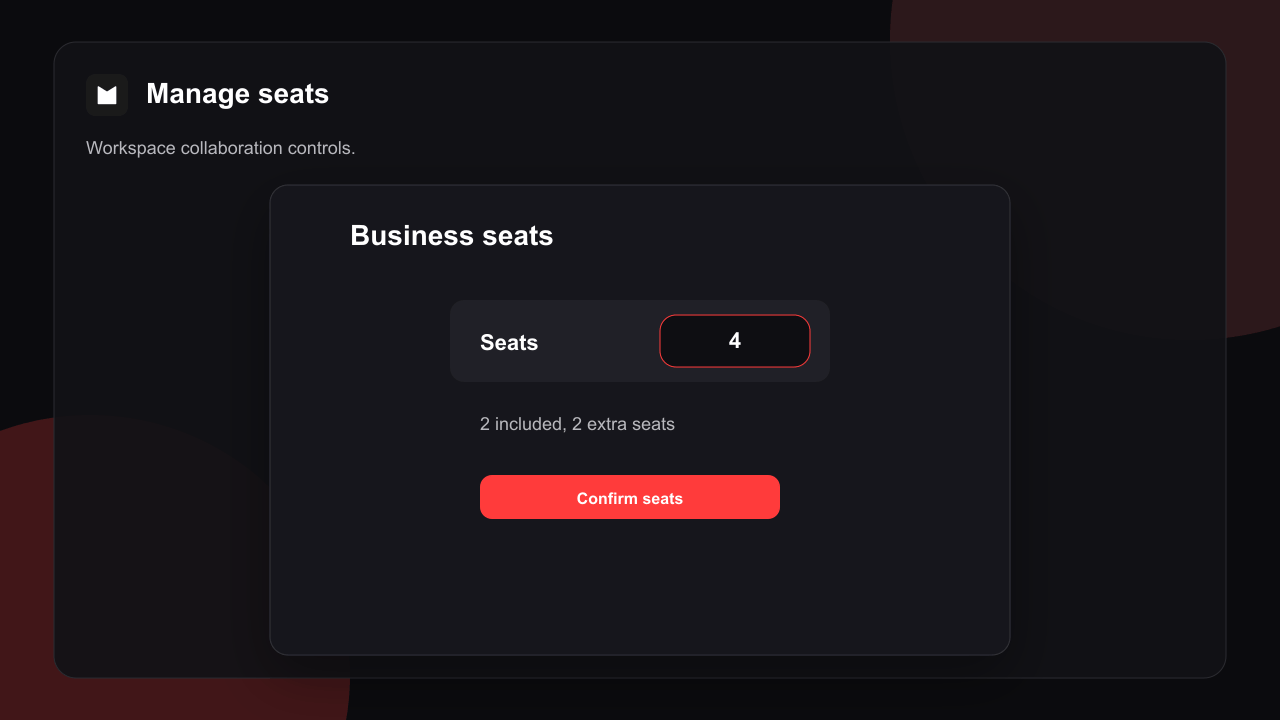
Business includes **2 seats**. Add more from **Settings → People & Access** or during Business checkout. Extra seats bill monthly (prorated when you change mid-cycle).
Seat controls appear when the workspace is on Business and you are owner or admin.
Use the stepper. The UI shows included vs extra seats and the price before you confirm.
New seats are available after checkout succeeds.
 Only workspace **owners and admins** can change seats or billing.
***
## Free a seat
Change an editor to **Viewer** or **Commenter**, or remove them. The seat frees immediately. Lower your purchased seat count after editors are off seats if you want a smaller bill.
***
## Who is billed
Subscription and seat charges go to the **workspace owner**. Admins can manage people and seats; invoices stay on the owner account.
AI generation is per person: a **seat holder** generates with Premium-level limits on their own account, and a **free collaborator** generates on their own plan's credits. Campaign **sending** uses the workspace owner's quota, since campaigns send from the owner's domain (see [Workspaces](/collaboration/workspaces)).
***
## Related
Switch workspace and shared credits.
Invite and roles.
Live editing on a brand.
Only workspace **owners and admins** can change seats or billing.
***
## Free a seat
Change an editor to **Viewer** or **Commenter**, or remove them. The seat frees immediately. Lower your purchased seat count after editors are off seats if you want a smaller bill.
***
## Who is billed
Subscription and seat charges go to the **workspace owner**. Admins can manage people and seats; invoices stay on the owner account.
AI generation is per person: a **seat holder** generates with Premium-level limits on their own account, and a **free collaborator** generates on their own plan's credits. Campaign **sending** uses the workspace owner's quota, since campaigns send from the owner's domain (see [Workspaces](/collaboration/workspaces)).
***
## Related
Switch workspace and shared credits.
Invite and roles.
Live editing on a brand.